UI/UX Design
By

Mad Brains Technologies


Summary:
You don’t always need a website redesign to improve your website. If the problem is limited to areas such as checkout, mobile usability, product pages, or navigation, targeted UX improvements may be enough. A full website redesign makes more sense when usability issues affect the entire user journey, the site has become difficult to maintain, your technology limits improvements, or your business and audience have changed. A website UX audit can help you identify the real problems and decide whether your website needs focused UX improvements or a complete redesign.
You don’t always need a full website redesign to fix usability issues. Improve your website UX when the problems are specific and can be fixed within your current structure. Consider a redesign when the problems are related to the existing structure, affect multiple parts of the user journey, or your website no longer supports your business goals.
For example, confusing navigation, difficult forms, weak CTA, or a bad mobile experience can be addressed with targeted UX improvements. A redesign is a better option if your website has outdated technology, a broken information architecture, inconsistent templates, and a user journey that no longer fits your business.
The key is to identify the root problem before deciding what to do. A website UX audit helps you determine whether your website needs targeted improvements or a complete redesign.
Also Read : How Do You Know When Your Website Needs a Redesign?
When UX Improvements Are Enough
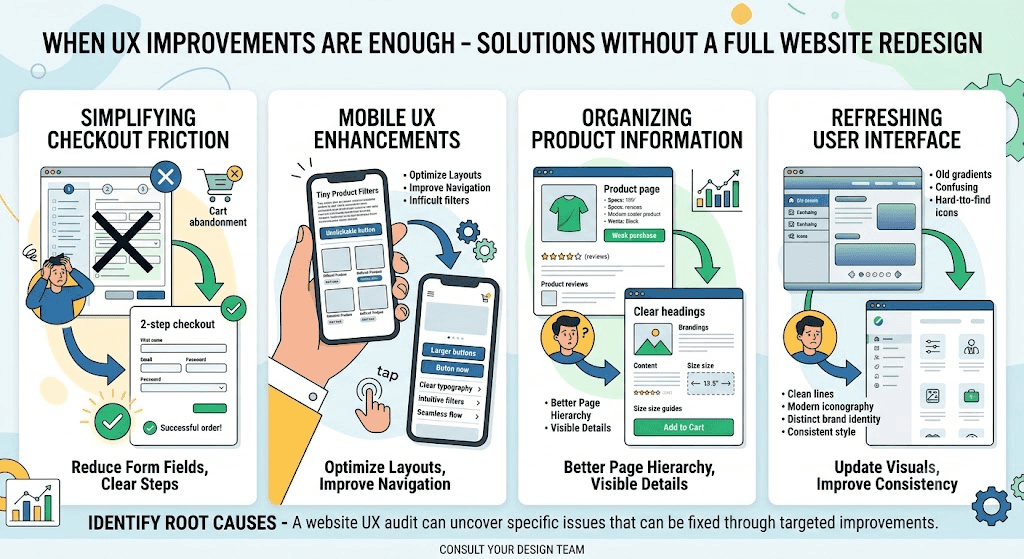
When your website has a solid foundation and the problems are limited to specific parts of the experience, a full website redesign isn’t necessary.
We have listed several cases where targeted UX improvements can fix friction without the time, cost, and disruption of rebuilding the entire site.
1. Checkout Causing Unnecessary Friction
Scenario: Think of an e-commerce store that gets good traffic and has a well-organized product catalog.
Problem: Customers are frequently abandoning their carts during checkout.
Solution: In this situation, you don’t need to redesign the whole website. The ideal solution is to simplify the checkout, remove unnecessary fields, improve error messages, or make guest checkout more viable. This addresses the actual problem without requiring a complete redesign.
Baymard’s research says that 17% of US online shoppers have abandoned an order because the checkout process was too long or complicated.
2. Mobile UX Needs Improvements
What this looks like: Consider an e-commerce store that gets good traffic but has a frustrating mobile experience.
Problem: Mobile users are struggling with product filters, navigation, forms, or selecting product variants.
Solution: You don’t have to redesign a website in this situation. Work on the responsive layout, simplify mobile navigation, make buttons and form fields easier to use, or improve the filtering experience. These are ways to improve website UX without rebuilding the entire website.
Baymard’s 2026 mobile e-commerce research found that 75% of mobile e-commerce sites had a “Mediocre” mobile UX rating. It shows how common mobile usability problems still are.
Also Read: Ecommerce UX Design: Turning Browsers into Buyers
3. Product Pages Make Information Difficult to Find
The situation: Think of an e-commerce store with good product photography and a working purchase process.
Problem: Customers are having trouble finding important information such as sizing, delivery details, specifications, or return policies.
Solution: You don’t need a full UX redesign in this situation. The best approach is to improve the product page layout, organize information more clearly, make important details easier to scan, and place key information in the right place.
Baymard’s product page research found that 52% of desktop sites and 62% of mobile sites had “Mediocre” or worse product page UX.
4. Navigation Works, but Users Struggle to Find What They Need
Here’s the situation: Consider a B2B or service-based website with all the necessary pages, but users have trouble getting the right service or information.
Problem: The content exists, but navigation labels, page grouping, or user pathways make it difficult to reach.
Solution: Don’t redesign the entire website in this situation. Improve navigation labels, reorganize related pages, add cleaner pathways between pages, or make important services easier to discover. These are a few practical ways to improve website UX while keeping the existing website structure.
The key is simple: start with UX improvements. Identify a specific usability problem and fix it without changing the website’s underlying structure. A website UX audit can help identify these issues before deciding whether a larger change is necessary.
Also Read: Enhancing Conversion Performance with Expert UI/UX Audit Services
When a Website Redesign Makes More Sense

Sometimes the problem isn’t small, like a single page or feature. It is the website’s underlying structure. In these situations, a website redesign is a better choice.
1. The Website Has Become a Patchwork
A typical case: Think of a website that is getting updated repeatedly over several years. New pages, features, sections, and templates have been added as per the needs.
Problem: Pages now look and work differently. Navigation is complex; content is difficult to organize, and fixing one issue often creates other issues somewhere else.
Solution: In this situation, UX improvements can only solve the symptoms. A website redesign can create a consistent design system, simplify the information architecture, and create a more consistent experience. If the entire website needs to be rethought, professional website design services can help rebuild the experience around your current goals.
2. Your Technology Is Limiting the User Experience
Imagine this: Think of a business that knows exactly what it wants to improve, but its current CMS, theme, or codebase makes even simple UX changes difficult.
Problem: Important improvements require workarounds, depend on outdated components, or keep breaking other parts of the website.
Solution: If the technology itself prevents you from improving the user experience, a redesign or rebuild may be more practical. Instead of repeatedly patching the existing system, you can create a stronger technical foundation that supports better UX and future changes.
3. Your Business or Audience Has Changed
Consider this: Think of a company that offers a few services but has since expanded into new markets, added new offerings, or changed its target audience.
Problem: The website still reflects the old business. Important services are difficult to find, the company's offerings are different from what they used to be, and the existing navigation doesn’t reflect how the business is structured today.
Solution: This goes beyond website usability. You have to rethink the website’s structure, content hierarchy, messaging, navigation, and conversion paths. In this situation, a website redesign can address the bigger problem instead of making isolated UX changes.
4. Problems Exist Across the Entire User Journey
The scenario: Consider a website where users struggle from the moment they land on the homepage. They can’t easily understand what the business offers, have trouble finding the right page, and face friction when trying to take the next step.
Problem: There isn’t one obvious UX issue to fix. Multiple parts of the website are creating friction.
Solution: When problems appear across several areas, a complete UX redesign is of great help. A broader redesign allows you to rethink the experience as one connected journey.
Nielsen Norman Group found an average task-success rate of 66% in a broad usability study, meaning users failed to complete their intended task about one-third of the time.
This is where website redesign services are valuable. The entire website can be restructured around your current business goals, users, content, and conversion paths.
The primary consideration when deciding when to redesign a website is simple: Are you fixing a few UX problems, or is the whole website no longer working well? If the problem is with the website’s structure, technology, or overall user journey, a redesign may be the better choice.
Also Read: Logistics Software Development and Design: When to Redesign
Real-World Examples: UX Improvement vs. Website Redesign
1. Fabletics: When a Specific UX Problem Needs Attention
Fabletics found that a significant number of users were abandoning the checkout process early. The issue was focused on the checkout experience rather than the entire website.
The team analyzed the checkout flow, carried out user research and usability testing, and improved the experience around the specific points where users were struggling. The project focused on modernizing the checkout rather than treating the entire website as a redesign problem.
What this shows: When you can identify a specific part of the user journey that's causing friction, you may not need to rebuild the entire website. Targeted UX improvements can be the more practical starting point.
2. Indiatimes: When the Problem Is the Website Structure
Indiatimes had grown into a large network covering ecommerce, travel, movies, email, blogs, and other services. As the website expanded, users faced problems with navigation, content organization, terminology, layouts, and the overall structure of the experience.
Human Factors International researched the existing sites and recommended changes to the information architecture, navigation, interaction, terminology, colour, and layout. Reusable page templates were also created to bring greater consistency across the experience.
What this shows: When usability problems exist across navigation, information architecture, multiple page types, and the overall structure, individual UX fixes may not be enough. That's when a broader website redesign can make more sense.
The key difference
The two examples show why the answer isn't always simply “redesign the website.”
If the problem is specific, start by improving that part of the experience.
If the problems are structural and spread across the website, a redesign is more likely to be the right approach.
Quick Checklist: Do I Need UX Improvements or a Website Redesign?
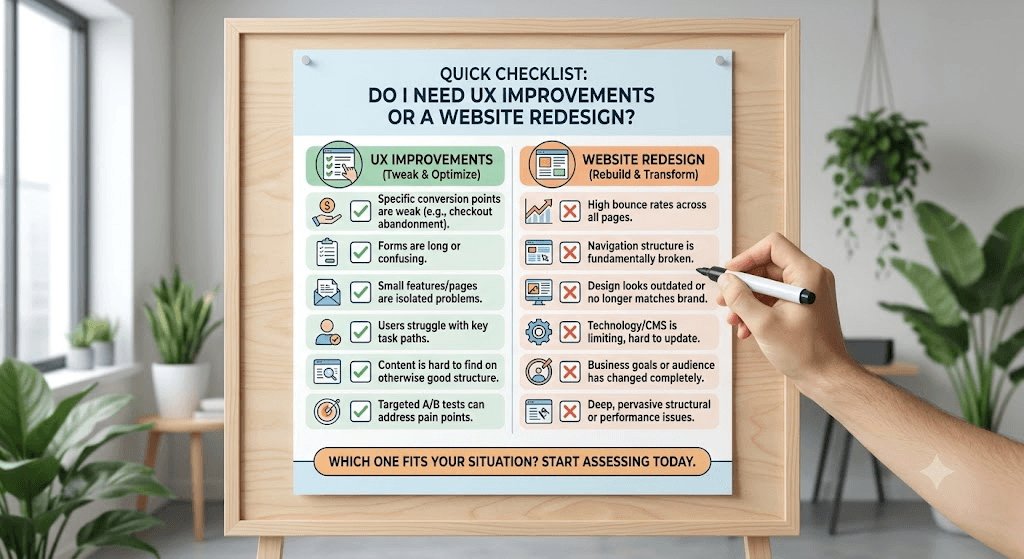
UX improvements may be enough if:
The problem is limited to a few pages or features.
Your navigation and website structure still make sense.
Users understand your offering but struggle with specific tasks.
Your current technology can support the improvements.
You can fix the issue without changing the overall website structure.
A website redesign may make more sense if:
Problems appear across multiple pages or user journeys.
Your navigation or information architecture no longer works.
Your website has become inconsistent after years of updates.
Your business, services, or audience has changed significantly.
Your technology makes important UX improvements difficult.
The website no longer supports your current business goals.
Conclusion
A full website redesign isn’t always the answer. If your website works well overall but has specific usability problems, targeted UX improvements can often solve them without rebuilding everything.
However, when problems affect the website’s structure, navigation, technology, content, or overall user journey, a redesign may be the better investment.
Before deciding, start by understanding what’s actually going wrong. A website UX audit can help you identify the biggest usability issues and determine whether you need a few improvements or a more comprehensive redesign. Want further assistance? Contact us now.
Not sure where your website stands?
Run a free UX audit with our UX Audit Tool to identify potential usability issues before deciding whether you need a redesign.
Frequently Asked Questions
Last updated:
Mad Brains Technologies
Enterprise UX & Product Strategy Team
Mad Brains is an enterprise UX and product consultancy focused on reducing product risk and accelerating growth. Through UX audits, conversion-led design, and full-stack development, the team helps organizations build scalable digital platforms that drive measurable business outcomes.