AI Automation
By

Mad Brains Technologies


Businesses can use AI workflow automation by placing AI agents at specific points in a workflow to handle tasks such as collecting information, checking data, making routine decisions, updating systems, and triggering the next step. For example, an agent can qualify a new lead, update the CRM, send a follow-up, and pass high-value prospects to a salesperson.
The key is to automate a complete workflow, rather than isolated tasks. Businesses can identify repetitive processes, assign suitable steps to an AI agent, define when human approval is required, and connect the agent to the systems it needs to complete those steps.
This is where AI-powered workflows can reduce manual coordination without removing people from the process.
If you want to understand the broader technology behind these workflows, read our guide to what agentic AI is and how it is changing business automation
Where Can AI Agents Fit Into Business Workflows?
AI agents for business are at specific stages of a workflow where information needs to be reviewed, a routine decision needs to be made, or an action needs to follow automatically.
For example, consider a lead management workflow:
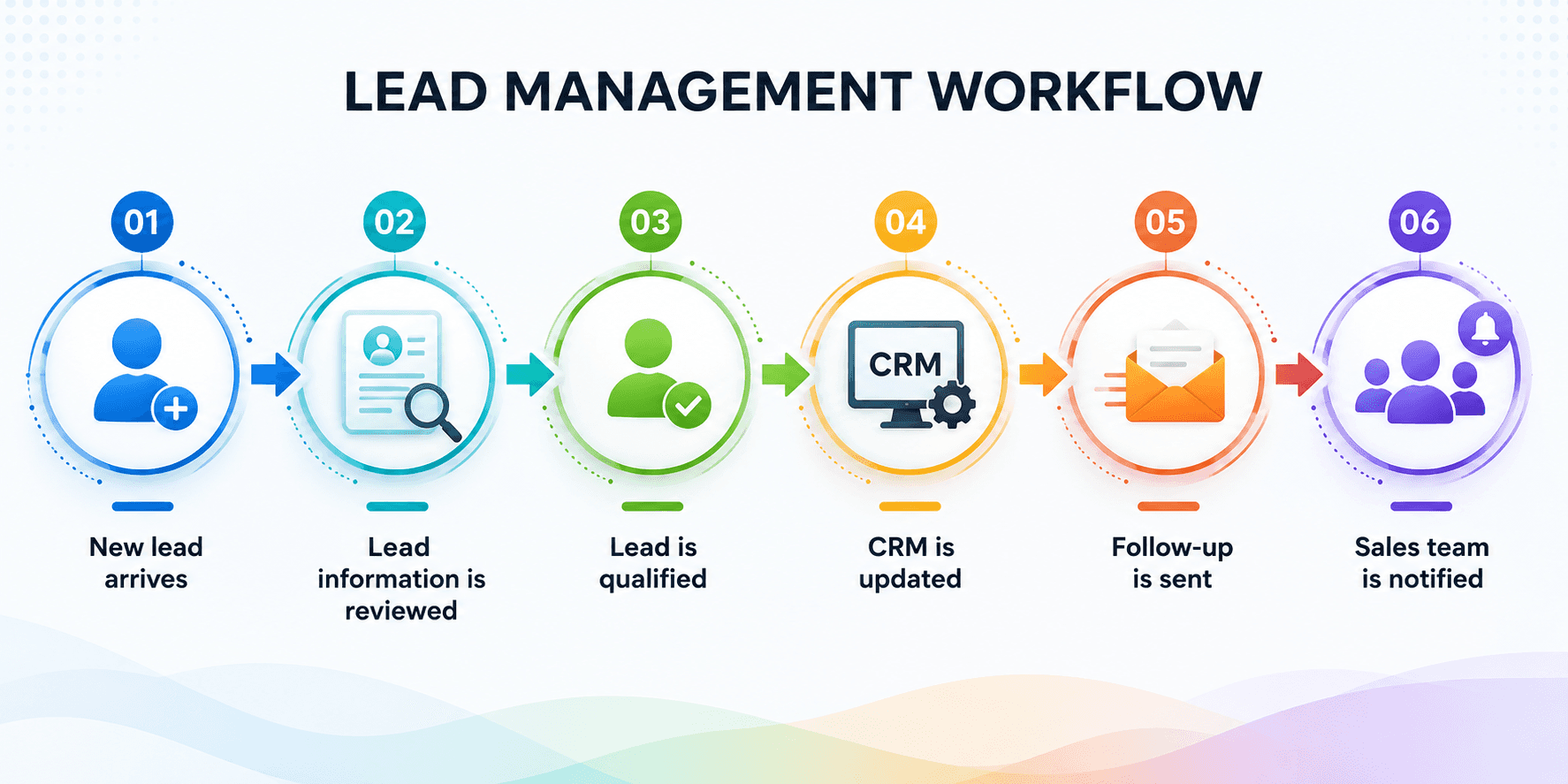
An AI agent can handle several of these steps instead of requiring an employee to move information between systems manually. If a lead doesn't meet the defined criteria, the agent can follow the appropriate workflow. If the situation falls outside those rules, it can hand the task to an employee.
The same approach applies to other business process automation opportunities. The agent doesn't need to control the entire process. It can take responsibility for the parts where automation provides a clear operational benefit, while the rest of the workflow remains under human control.
How Are Businesses Using AI Agents to Automate Workflows?
The most practical applications are workflows that involve repeated information handling, routine decisions, and several connected actions.
1. Lead Management
An agent can review incoming leads, check available information, apply qualification criteria, update customer records, and trigger follow-up messages. Sales teams can then focus their time on leads that need direct attention.
2. Customer Support
An AI agent can classify incoming requests, retrieve relevant customer or order information, and handle eligible requests based on approved processes. Cases that require negotiation, judgment, or additional investigation can be routed to a support employee.
3. Finance and Invoice Processing
Invoice workflows often involve extracting information, checking records, identifying discrepancies, and requesting approval. An agent can handle the routine stages and flag invoices that don't match the expected criteria instead of requiring employees to check every document manually.
4. Employee Onboarding
Onboarding involves several departments and systems. An agent can coordinate tasks such as collecting required information, sending relevant documents, creating internal requests, and notifying teams when an employee reaches the next stage.
5. IT Support
For common technical issues, an agent can collect information about the problem, perform approved checks, update the relevant ticket, and suggest or execute the next permitted action. Issues that can't be resolved within its defined scope can be escalated to IT staff.
These AI-powered workflows work best when the process has clear objectives and boundaries. The agent should know what it can do, what requires approval, and what happens when an exception occurs.
How Can Businesses Get Started With AI Workflow Automation?
Businesses don't need to automate their most complicated process first. A better starting point is a workflow that happens frequently, involves repetitive coordination, and has a clear outcome.
Start by mapping the existing process from beginning to end. Identify which steps require information gathering, routine decisions, or actions across different systems. Those are potential areas for agentic automation.
Next, separate tasks the agent can handle from those that should remain with employees. Set appropriate permissions, approval points, and escalation rules before giving an agent access to the workflow.
A controlled pilot can then show whether the automation actually improves the process. If it performs reliably, the same approach can be extended to other workflows.
Conclusion
AI workflow automation is most useful when it solves a specific operational problem rather than being added simply because AI is available. Businesses can start with one well-defined workflow, give an AI agent responsibility for suitable steps, and keep employees involved where decisions need human judgment. This creates a practical path toward greater automation without trying to hand complete control of business processes to autonomous AI agents.
FAQs
Last updated:
Mad Brains Technologies
Enterprise UX & Product Strategy Team
Mad Brains is an enterprise UX and product consultancy focused on reducing product risk and accelerating growth. Through UX audits, conversion-led design, and full-stack development, the team helps organizations build scalable digital platforms that drive measurable business outcomes.