UI/UX Design
MacBook Neo Just Shipped. Here's What It's Quietly Telling You About Your Website's UX.
By

Abhinav Sharma


TL;DR
The MacBook Neo is the most affordable Mac Apple has ever sold. It has a standard sRGB display (not P3 wide color), 8GB RAM, no backlighting, and Apple Intelligence built in — all for $599. It will be bought by millions of budget-conscious professionals, students, and first-time Mac users. These are your users. And their device is quietly exposing UX gaps that most products haven't tested for. Here are the 5 implications your product team needs to act on now.
The MacBook Neo just shipped. March 11, 2026.
100,000+ people searched for it this week alone. It trended at +1,000% across the United States, United Kingdom, Canada, and Australia simultaneously — and as of this morning, it is still listed Active in Australia's Technology trending chart.
The tech press is busy talking about the A18 Pro chip, the $599 price, the fun colors. That's fine. But here's what nobody in the design and UX press is talking about:
The MacBook Neo's spec sheet is a direct message to every designer and product team about what your users are actually experiencing when they visit your website or open your product.
And most teams are going to miss it. What Actually Shipped Today
Before we get into the UX implications, here are the hard specs — because the details matter:
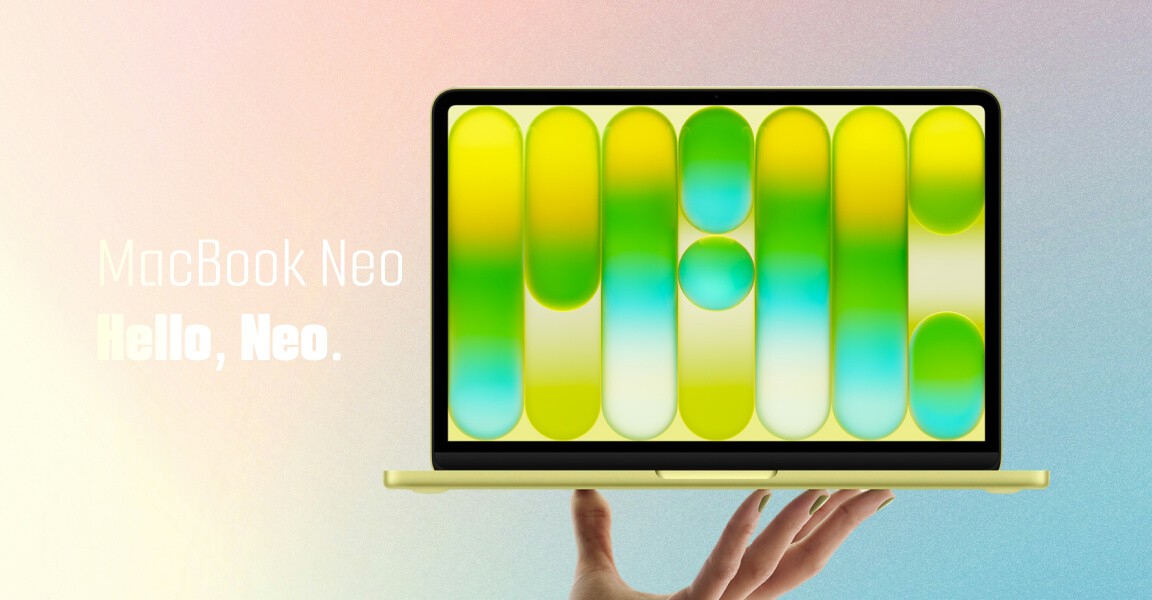
The MacBook Neo features a 13-inch Liquid Retina display at a resolution of 2408×1506, and uses an Apple A18 Pro chip — making it the first Mac released with an A-series chip rather than an M-series chip.
It is priced from $599, comes in four colors (Silver, Indigo, Blush, Citrus), and promises up to 16 hours of battery life.
The MacBook Neo has only 8GB of RAM with no upgrade option. There is no MagSafe, one USB-C port runs at USB 2 speeds, and the keys are not backlit.
Unlike the MacBook Air and MacBook Pro, the MacBook Neo display is sRGB rather than Wide Color (P3), and it also lacks True Tone technology.
That last one is the sentence your design team needs to read twice.
UX Implication 1: Your Colors Are Lying to Half Your Audience
This is the one that's going to sting.
For years, Apple's display ecosystem has been training designers to work in P3 wide color — a color space roughly 25% larger than sRGB, capable of more saturated reds, deeper greens, and richer overall contrast. Every MacBook Air, every MacBook Pro, every Pro Display XDR — P3.
The MacBook Neo can't compete with the MacBook Air and MacBook Pro screens, which offer more vibrant, richer colors that are better for creative work. Colors on the MacBook Neo screen will still look good, but be less saturated and less accurate for professional color work.
Now here's the problem.
If your design team works on MacBook Pros with P3 displays, every color decision they make — button colors, background gradients, brand accents, call-to-action contrast — is being calibrated on a screen that shows colors more vividly than what MacBook Neo users will ever see.
Your carefully chosen orange CTA button? Slightly duller on their screen.
Your brand's signature teal? Less punchy than you intended.
That subtle gradient you spent an hour perfecting? Flatter.
This isn't catastrophic — sRGB still renders well. But when your entire visual hierarchy and emotional tone have been tuned on P3 displays, and half your new Mac audience is on sRGB, you're serving two different visual experiences without realizing it.
What to do: Test your product's visual design on an sRGB-calibrated display before your next sprint. Specifically check: CTAs, contrast ratios on key actions, brand color accuracy, and any gradients used for navigation cues.
UX Implication 2: Your Page's Performance Just Got a Real-World Test
Apple made the MacBook Neo for those who need a more affordable machine and who otherwise would have opted for a Windows PC or a Chromebook, including students. For EDU customers, the MacBook Neo starts at just $499.
Read that again: Chromebook competitor.
This is not a pro machine. This is the device that students, first-time Mac buyers, and budget-conscious professionals will be using to browse your website, evaluate your SaaS product, or complete your checkout flow.
With the A18 Pro chip from the iPhone 16 Pro models and 8GB RAM, the MacBook Neo is able to run all Apple Intelligence features, but as AI gets more advanced and Apple adds new capabilities, there's a chance it could fall behind.
8GB of unified memory, shared between CPU and GPU. Multiple browser tabs, a Slack notification, an app running in the background — and your product's website is now competing for resources on a constrained system.
Heavy JavaScript bundles. Unoptimized images. Animations that hammer the GPU. Third-party scripts that fire on page load. Every one of these has always been a bad idea — but now you have a concrete device profile that exposes them.
Sites that take more than 3 seconds to load lose 53% of visitors before the page even renders. On a constrained 8GB device running multiple apps, that number gets worse.
What to do: Run a Lighthouse performance audit against a throttled device profile similar to the MacBook Neo's specs. Look specifically at JavaScript bundle size, image weight, and render-blocking resources. This is a core part of what a UX Audit surfaces — not just how your product feels, but whether it performs under real-world constraints.
If this sounds familiar, you're not alone. We've caught this pattern in multiple audits — bloated product pages that look fine on a Pro machine but stutter on the exact devices your actual users are running.
See what a UX Audit uncovers →
UX Implication 3: Apple Intelligence Is Now Your User's Baseline Expectation
At the heart of MacBook Neo is A18 Pro, enabling users to power through things they do every day. A 16-core Neural Engine supports fast on-device Apple Intelligence features and everyday AI tasks, while ensuring user data stays private and secure.
Apple Intelligence — Apple's built-in AI suite — is available on every single MacBook Neo, out of the box, on day one. Summarization, rewriting, smart notifications, visual intelligence, translation.
At $599. The Chromebook-competing price.
This matters enormously for your UX, and here's why: when users have AI assistants summarizing, rewriting, and filtering content at the OS level, their tolerance for dense copy, buried value propositions, and unclear navigation drops significantly.
If a user can ask Apple Intelligence "what does this app do?" and get a cleaner answer than your homepage delivers, your UX has a clarity problem.
The implication isn't "add AI to your product." It's simpler than that: if your content structure, microcopy, and information architecture aren't immediately machine-readable, you're invisible to the AI layer your users now live inside.
We flagged this exact pattern when working with a travel platform client — their homepage was visually beautiful but semantically ambiguous. Apple Intelligence and AI browsers would summarize it as "a travel company" — losing all the specific differentiation that made them worth choosing. A focused UX Audit restructured the content hierarchy. The AI summaries became accurate. The humans reading them converted better.
What to do: Read your own homepage as if you know nothing about your company. Then ask: would a 2-sentence AI summary of this page be correct and compelling? If not, you have an information architecture problem — not a design problem.
UX Implication 4: The "What You Remove" Design Lesson Apple Just Taught the Industry
On paper, a MacBook with an iPhone chip, 8GB of RAM, and no backlit keyboard might sound like a compromise machine. But what makes the MacBook Neo potentially momentous isn't any single spec. It's what it represents.
Apple removed Thunderbolt. Removed MagSafe. Removed the backlit keyboard. Removed Force Touch. Removed P3 color. Removed 16GB RAM.
And still built something people are lining up to buy.
There's a design philosophy lesson buried in that list. The MacBook Neo proves — again — that the best products are defined not just by what they include, but by what they're confident enough to leave out.
Most product teams we audit do the opposite. They add. New features. New onboarding modals. New tooltips. New navigation options. New CTAs on pages that already have three.
Every addition feels justified individually. Together, they create cognitive overload that kills conversion.
We saw this clearly in the Barbeque Nation audit. Their booking flow had six friction points — all added over time with good intentions: a promo banner here, an upsell prompt there, a "complete your profile" nudge mid-checkout. When we removed four of them, conversions went up 72%. Not because we added something clever. Because we stopped interrupting the user's intent.
The MacBook Neo's spec sheet is a masterclass in intentional subtraction. Your UX should be too.
What to do: Audit your highest-traffic user journey and count every element that doesn't directly serve the user's primary goal on that page. Every extra modal, banner, secondary CTA, and tooltip is a tax on attention. What would happen if you removed half of them?
This is exactly what a UX Audit maps — the friction you've stopped seeing because you've been living inside your product too long.
UX Implication 5: The Budget User Is Your Actual User — Design for Them, Not for Yourself
Here's the most important thing the MacBook Neo confirms.
Apple has officially shaken up the entry-level laptop market. To hit that aggressive price point, Apple made some bold — and controversial — decisions.
The MacBook Neo is Apple's loudest statement yet that the mainstream consumer — not the creative professional — is the center of their ecosystem strategy. $599. For a Mac. Competing with Chromebooks and Windows budget laptops for students and first-time buyers.
These users are now on the Apple ecosystem. They use Safari. They use Apple Intelligence. They notice when apps feel premium and when they don't. And they will judge your product by the same standards as everything else on their $599 machine.
Most product teams unconsciously design for themselves. They test on their own MacBook Pros. They use their own fast fiber connections. They have product knowledge that blinds them to what a first-time visitor actually sees.
The MacBook Neo is a useful forcing function: sit down, close half your browser tabs, open your product on a constrained device, and experience it as your actual user does.
What you'll find is what a UX Audit finds. The gaps that are invisible to insiders. The friction points that feel obvious to everyone except the team who built the product.
We built our UI/UX Subscription specifically for this — teams that don't need a full redesign, but need a consistent, expert eye on their product that isn't blinded by familiarity. Monthly design sprints, informed by user behavior data, aligned to what your actual users experience on their actual devices.
See how our UI/UX Subscription works →
The Broader Signal
The MacBook Neo isn't just a product launch. It's a signal.
Apple — the company most associated with premium hardware, P3 wide color, Thunderbolt, and haptic Force Touch — just decided that the mainstream market is worth serving without all of that.
That mainstream market is now on a Mac. With Apple Intelligence. Browsing your website on a constrained device with an sRGB display, 8GB RAM, and zero patience for slow pages or confusing navigation.
The companies that update their UX in the next 30 days — testing on real device profiles, auditing content clarity, removing friction that's accumulated over years — will convert those users.
The companies that wait for the next quarterly design sprint will watch their analytics and wonder why bounce rates are climbing.
What Mad Brains Does
Mad Brains is a conversion-focused digital product and UX partner for growth-stage brands.
We don't sell redesigns. We sell clarity.
Our UX Audit is a structured, evidence-based review of exactly where your product is leaking conversions — based on real user behavior data, heuristic analysis, and the real device environments your users are in right now.
We've worked with Barbeque Nation (+72% conversions), JustWravel, Tanishq, and Kotak Life. Our process: diagnose first, design second.
If a $599 laptop just shipped and you don't know whether your product performs well on it — that's the diagnosis you need.

FAQ
Q: Does the MacBook Neo's sRGB display affect how my website looks?
Yes. If your design team works on P3 wide-color displays (MacBook Air, MacBook Pro), your color choices — CTAs, brand accents, gradients — appear more saturated to you than they will to MacBook Neo users. sRGB renders approximately 25% less color gamut than P3. Test your product's visual hierarchy on an sRGB-calibrated display, especially key action buttons and contrast-dependent navigation cues.
Q: Is 8GB RAM a UX concern for web products?
Indirectly, yes. 8GB of unified memory shared between CPU and GPU means the MacBook Neo runs with less headroom than most developer machines. Heavy JavaScript bundles, unoptimized images, and render-blocking scripts create noticeably slower experiences on constrained hardware. If your product loads smoothly on a MacBook Pro but slowly on an 8GB device, you have a performance UX gap — and performance directly affects conversion rates.
Q: What is Apple Intelligence and why does it matter for UX design?
Apple Intelligence is Apple's on-device AI suite — available on every MacBook Neo from day one. It includes content summarization, rewriting tools, and visual intelligence. For UX designers, the implication is that users now have AI tools reading and summarizing your product's content at the OS level. If your information architecture is unclear or your value proposition is buried, Apple Intelligence will generate weak or inaccurate summaries of your product — before your user even reads a word. Good UX in 2026 means your content structure works for machines, not just humans.
Q: What is a UX Audit and should I get one after the MacBook Neo launch?
A UX Audit is a structured, data-backed review of your digital product — website, app, or SaaS platform — identifying specific friction points, navigation failures, and design gaps that are costing you conversions. The MacBook Neo launch is a useful trigger for one because it introduces a new class of mainstream users with different device profiles, display specs, and hardware constraints than your typical power-user audience. An audit identifies whether your product is ready for them — and tells you exactly what to fix for maximum conversion impact.
Q: Does Mad Brains do UX Audits for SaaS products and e-commerce?
Yes. Our UX Audit is used by SaaS platforms, e-commerce brands, and digital-first businesses. We diagnose the specific drop-off points, friction patterns, and UX failures in your product's actual user journeys — not a generic checklist. We've audited products for brands including Barbeque Nation (restaurant reservations), JustWravel (travel), Tanishq (e-commerce), and Kotak Life (fintech). Each audit is specific to your product's flows, your user profiles, and your conversion goals.
Published: March 11, 2026 — MacBook Neo launch day
Sources: Apple Newsroom, Macworld, MacRumors, Wikipedia, 9to5Mac, Tom's Hardware
Mad Brains Technologies LLP — UX Audit · UI/UX Subscription · Custom Development
themadbrains.com/ux-audit-services
themadbrains.com/contact-us
Last updated:
Abhinav Sharma
Founder & CEO | Enterprise UX & Growth Strategy
Abhinav Sharma is the Co-Founder & CEO of Mad Brains, specializing in enterprise UX audits, conversion-focused product design, and high-impact experience systems. He helps SaaS, healthcare, and fintech companies reduce usability risk, increase conversions, and build scalable, user-centered platforms.