UI/UX Design
Artificial Intelligence Design That Users Actually Trust: Why Most AI Features Fail (and the Audit-First Fix)
By

Mad Brains Technologies



Answer : Artificial intelligence design is the practice of integrating AI capabilities — such as recommendations, predictions, automation, and natural language interfaces — into digital products in ways that are useful, trustworthy, and aligned with real user needs. It encompasses both the UX of AI-powered features and the strategic decisions about where AI adds genuine value versus where it creates confusion or erodes trust.
Let’s clear up the confusion first. When people search for “artificial intelligence design,” they’re usually looking for one of two things: AI-powered design tools (like Canva’s Magic Design or Uizard) or the practice of designing AI-powered product experiences. This guide is about the second and it’s the one that will determine whether your product thrives or joins the 95% graveyard.
Artificial intelligence design sits at the intersection of UX strategy, product thinking, and AI capability. It answers questions like:
“Where in our product would AI actually reduce friction for users?”
“How do we design the interface so users trust the AI’s output?”
“What happens when the AI gets it wrong — and how does the interface recover?”
These aren’t engineering questions. They’re design questions. And they’re the questions that separate AI products people adopt from AI products people abandon.
Here’s why product leaders should care: according to Forrester Research, every $1 invested in UX returns $100. But that return evaporates when you’re investing in AI features nobody asked for, nobody trusts, or nobody can figure out how to use.
The Nielsen Norman Group’s State of UX 2026 report puts it bluntly: users are fatigued by lazy AI features. When every product adds an AI sparkle button, it becomes noise, not novelty. The companies that win are the ones that use AI thoughtfully — and that starts with design, not engineering.
AI Design Decision | Gets It Right | Gets It Wrong |
Where to add AI | Automates a task users find tedious | Adds AI to impress investors, not users |
|---|---|---|
How to surface AI output | Clear, editable, with confidence signals | Black box — “the AI said so” |
What happens when AI fails | Graceful fallback + user control | Vague error or silent failure |
When to introduce AI | After base UX is solid | Before core workflows even function |
How to build trust | Transparency + progressive disclosure | Overpromising — “magical AI” marketing |
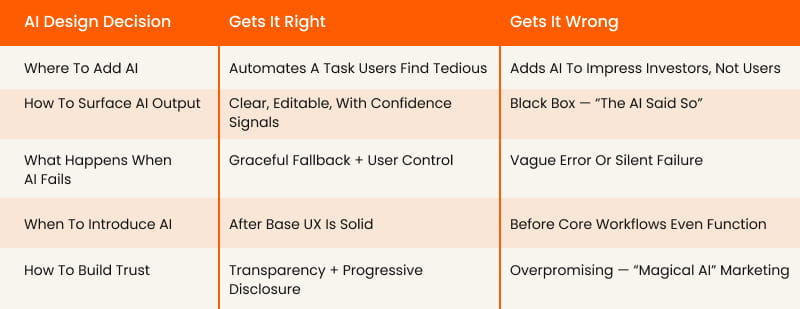
This is why we always recommend starting with a UX audit before designing any AI features. You need to understand whether your product’s foundation can support the weight of AI — or whether it’ll collapse under it.
Why Do 95% of AI Features Fail to Deliver Business Impact?
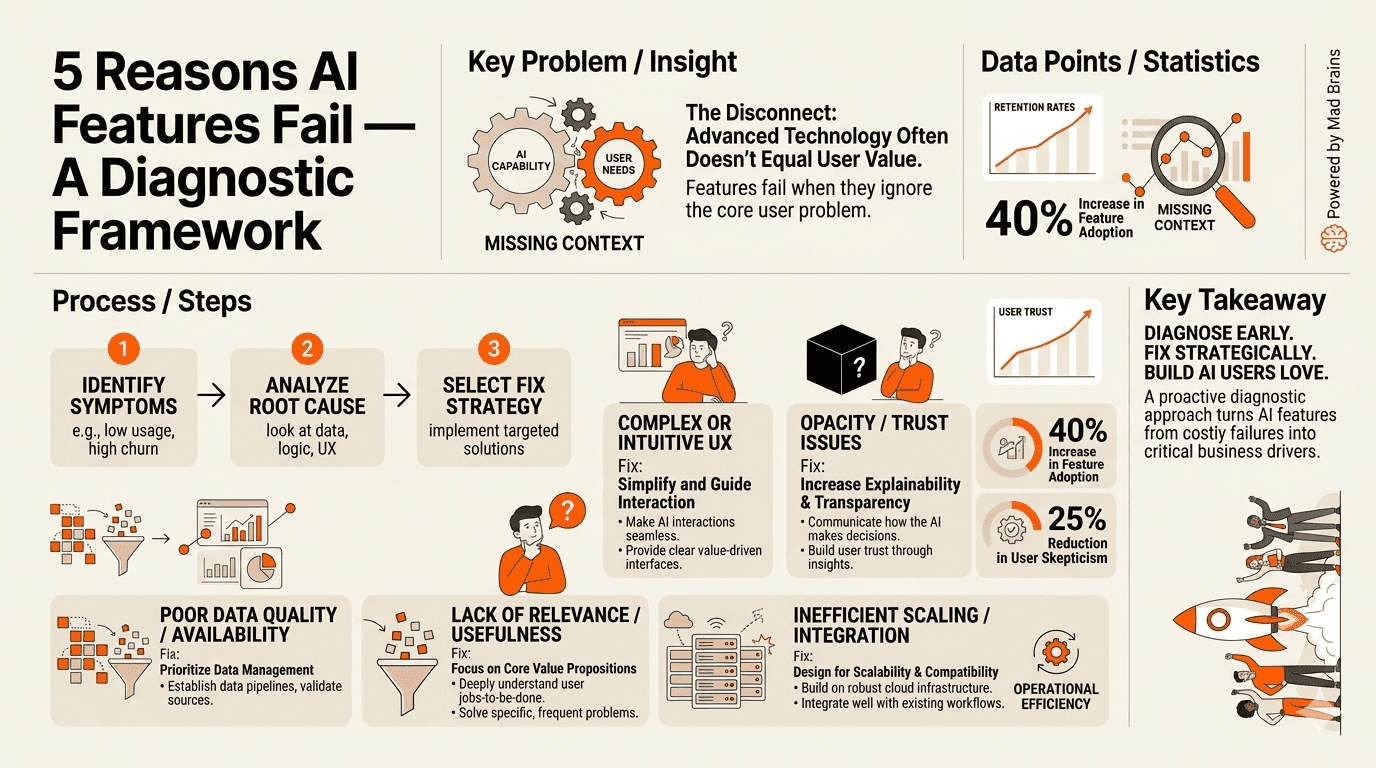
Let’s sit with that number for a moment. The MIT GenAI Report found that 95% of generative AI pilots yielded no business impact. Not “limited” impact. Zero. And 40% of failed AI MVPs were technically functional — the models worked fine. They failed because they didn’t fit into how people actually work.
After reviewing dozens of AI-powered products, we’ve identified five root causes and they’re all design problems, not engineering problems.
1. AI Bolted Onto Broken UX
We call this the “turbocharger on a flat tire” problem. Your core onboarding flow drops 70% of users. Your dashboard is a data dump. Your mobile experience barely functions. And your response? Ship an AI chatbot.
AI amplifies whatever experience already exists. If your UX is clear, AI makes it faster. If your UX is confusing, AI makes it more confusing — and more expensive.
The fix: Audit your core workflows before designing any AI features. Use session recordings to identify where users already struggle. If those friction points exist without AI, adding AI won’t solve them — it’ll mask them behind a more sophisticated failure.
How to diagnose it: Ask your support team: “What are the top 5 questions users ask every week?” If those questions are about basic navigation, account setup, or finding features, your problem is UX fundamentals — not a missing AI feature.
2. No Clear User Problem Defined
We consistently see product teams start with “We need to add AI” instead of “Our users struggle with X could AI help?” The first framing is a technology push. The second is a design question. They lead to radically different outcomes.
MIT’s report found that successful AI implementations started by automating internal workflows before exposing AI to users. They identified specific, measurable friction points and asked whether AI could reduce them.
The fix: Interview 5–10 users. Ask one question: “What’s the most repetitive or frustrating task you do in our product?” If their answers don’t match your AI roadmap, you’re building for your board, not your users.
How to diagnose it: Write a one-sentence user story for your planned AI feature: “As a [user], I want [AI to do X] so I can [achieve Y].” If you can’t fill in [achieve Y] with a specific, measurable outcome, the feature doesn’t have a user problem yet.
3. Overpromising and Underdelivering
The NNGroup State of UX 2026 report calls it “AI slop.” When every product promises “magical AI,” users quickly learn to distrust all of them. Overpromising erodes the trust that AI features depend on to be useful.
Research shows that 88% of users abandon AI tools after a single poor experience — significantly worse than the 70% abandonment rate for traditional software. Users hold AI to a higher standard because the marketing sets a higher expectation.
expectation.
The fix: Underpromise and overdeliver. Launch AI features with clear scope limitations visible in the interface. Use language like “Suggested by AI — review before using” instead of “AI-powered magic.” Let users discover the value instead of being sold it.
How to diagnose it: Compare your marketing copy for AI features against actual user success rates. If you’re promising “intelligent automation” but users succeed less than 80% of the time, you have a trust problem building.
4. Ignoring the 80% Problem
Large language models are probabilistic systems. They work “most of the time.” But as product designers know, a feature that works 80% of the time feels worse than a feature that doesn’t exist. Users don’t trust tools that are unreliable, even if they’re impressive when they work.
An AI scheduling assistant that successfully books meetings 80% of the time means you’re manually fixing errors 20% of the time — which feels worse than scheduling manually. A checkout flow that fails 20% of the time doesn’t just lose transactions. It loses brands.
The fix: Design for the failure case first. Build deterministic fallbacks for every AI interaction. If the AI can’t complete a task reliably, use it for suggestions instead of actions. Keep the human in control of final decisions.
How to diagnose it: Measure your AI feature’s success rate over 100 real interactions. If it’s below 95% for critical workflows or below 85% for non-critical ones, you need a fallback design before you scale.
5. Zero User Research Before Shipping
This is the most common and most expensive mistake. Teams ship AI features based on competitor analysis (“Slack added a copilot, so we need one too”) or executive enthusiasm (“The CEO saw a demo at a conference”) without ever asking users whether they want it.
The result? Features nobody uses, support tickets nobody expected, and engineering resources diverted from improvements users actually requested.
The fix: Before committing to any AI feature, run a lightweight concept test. Show 10 users a mockup of the proposed AI interaction. Watch their faces. If they say “that’s interesting” instead of “when can I have this?” you need to go back to the drawing board.
How to diagnose it: Check your analytics for the last AI feature you shipped. What’s the day-7 retention rate for users who tried it? If it’s below 30%, users tried it out of curiosity but didn’t find lasting value.

Should You Add AI to Your Product — or Fix Your UX First?

Here’s a conversation we have nearly every week with product leaders:
“We need to add AI to stay competitive. Our competitors all have copilots now.”
Our response: “Show us your activation rate. Show us your onboarding completion. Show us where users drop off.” Silence.
hat silence tells us everything. If you don’t know where users struggle in your current product, you definitely don’t know where AI will help them. And you’re about to spend $100K–$500K building AI features on top of a broken foundation.
Most teams add AI. We diagnose first.
Proof: How We Drove 72% More Conversions for Barbeque Nation
When we audited Barbeque Nation’s booking flow, we found 12 friction points in a 4-step process. Users were confused by forced account creation, unclear date selection, and missing confirmation states.
The team could have added an AI-powered booking assistant. Instead, we fixed 3 critical friction points in the existing flow.

The AI lesson: An AI booking assistant would have cost 10x more, taken 3x longer, and delivered a fraction of the impact. The friction wasn’t a technology problem — it was an information architecture problem. No amount of artificial intelligence fixes bad information architecture.
Proof: How JustWravel Cut Bounce Rates by 38.6%
JustWravel, a travel platform with strong organic traffic, was experiencing high bounce rates. Their assumption: users needed a smarter search experience, possibly AI-powered recommendations.
Our audit revealed a different story. Users were bouncing because of invisible friction in the search-to-booking flow — unclear filters, too many simultaneous options, and a checkout process without trust signals. After implementing audit-backed changes, JustWravel saw a 38.6% bounce rate reduction and gained 50,000 new users.
The AI lesson: AI-powered recommendations would have added complexity to an already-overwhelming interface. The real fix was simplifying the decision architecture giving users fewer, better options with clearer paths to action.
The AI Decision Matrix: Where Does Intelligence Actually Belong?
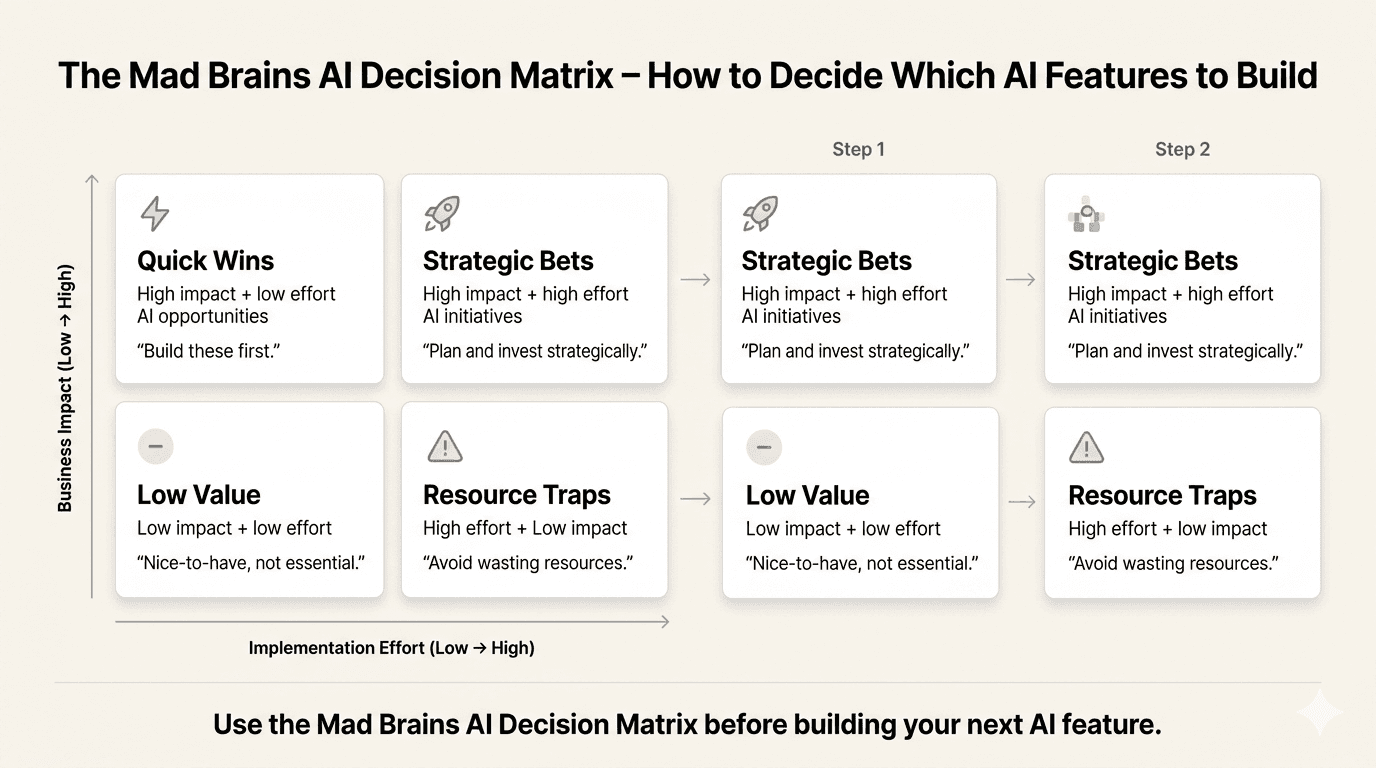
Before you build any AI feature, plot it on this matrix:
UX Is Solid (>80% Workflow Completion) | UX Is Broken (>80% Workflow Completion) | |
|---|---|---|
AI Solves a Real User Problem | BUILD IT — Strong foundation + clear user need. This is where AI creates real value. Ship with Trust-First principles. | AUDIT FIRST — Users need it, but the base experience can’t support it yet. Fix the foundation, then layer AI on top. |
AI Doesn’t Solve a Real User Problem | SKIP IT — Solid UX doesn’t need AI decoration. Focus engineering on features users actually requested. | FIX UX — Your product has fundamental experience problems. AI will amplify them. Audit and fix the foundation first. |
Most products we audit fall in the bottom-right quadrant: broken UX + AI that doesn’t solve a real user problem. That’s the $35–40 billion graveyard MIT described.
Here’s how the two approaches compare:
Factor | Adding AI Features First | Audit- First The Mad Brains |
|---|---|---|
Starting point | Competitor mimicry + executive enthusiasm | User behavior data + heuristic analysis |
Timeline | 3–6 months to ship, uncertain impact | 2–4 weeks to actionable insights |
Risk level | High — building on assumptions | Low — evidence-based decisions |
Typical Cost | $100K–$500K for AI feature development | Fraction of a full AI build |
Typical ROI | 95% of AI pilots fail (MIT) | 72% conversion lift (BBQ Nation) |
What you learn | Whether the AI feature works (maybe) | Where AI belongs + where it doesn’t (definitely) |

How Do You Design AI Features That Users Actually Trust?
Answer: Trustworthy artificial intelligence design follows six principles, which we call the Trust-First Design Framework: transparency (show what AI did), user control (let people override and edit), progressive disclosure (introduce AI gradually), graceful failure (design for when AI is wrong), explainability (surface the reasoning), and human-in-the-loop (keep humans in charge for critical decisions). These principles ensure AI enhances the user experience rather than undermining confidence in your product.
NNGroup’s State of UX 2026 report names trust as a major design problem for AI in 2026. And it’s getting harder, not easier. As more AI agents roll out often before they’re ready — users are becoming increasingly skeptical of anything labeled “AI-powered.”
After designing and auditing AI-powered products across SaaS, e-commerce, and fintech, we’ve codified what works into what we call The Trust-First Design Framework — six principles that separate AI features users adopt from AI features users abandon. Here’s each principle with implementation steps and concrete before/after examples.
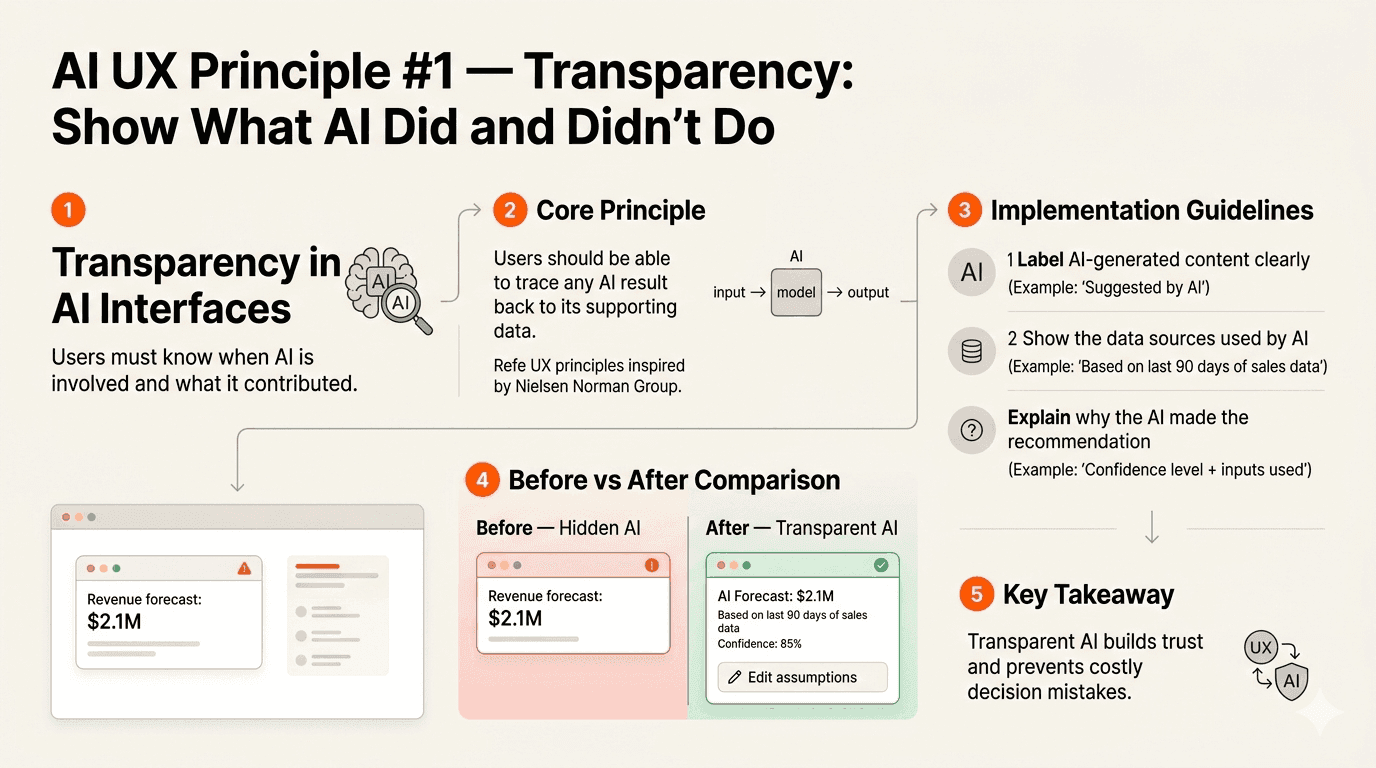
1. Transparency: Show What AI Did and Didn’t Do
Users need to know when AI is involved and what it contributed. Hide it, and you create an uncanny valley of uncertainty. A Nielsen Norman Group principle: users should be able to trace any AI result back to its supporting data.
Implementation: Label AI-generated content clearly (“Suggested by AI” or “AI-assisted”). Show the data sources the AI used. If the AI made a recommendation, explain what inputs drove it. Never disguise AI output as human-authored.
Before (bad): A SaaS dashboard shows “Revenue forecast: $2.1M” with no indication AI generated it. Users assume it’s a calculated total and make budget decisions based on it.
After (good): “AI Forecast: $2.1M (based on last 90 days of sales data, 85% confidence) Edit assumptions.” Users know the source, the confidence level, and can adjust inputs.
2. User Control: Let People Override, Edit, Undo
The best AI features amplify user capability without taking away agency. If users can’t edit, reject, or undo an AI action, they’ll stop trusting it and stop using your product.
Implementation: Every AI action should have an explicit undo option. AI suggestions should be editable inline. For critical workflows (payments, data changes, communications), require explicit user confirmation before the AI acts.
3. Progressive Disclosure: Introduce AI Gradually
Don’t dump every AI capability on new users simultaneously. Start with simple, low-risk suggestions. As users build confidence and the AI learns their preferences, gradually introduce more autonomous features.
Implementation: Day 1: AI offers suggestions users can accept or reject. Week 2: AI pre-fills fields based on learned patterns. Month 2: AI takes autonomous action on low-stakes tasks with user review. Never skip stages.
4. Graceful Failure: Design for When AI Is Wrong
AI will be wrong. The question isn’t whether it’s how your interface handles it. Vague error messages (“Something went wrong”) are the fastest path to user abandonment.
Implementation: When AI fails, tell users what happened, why, and what they can do next. Offer a manual fallback for every AI-automated workflow. Track AI failure rates and trigger automatic fallback to deterministic logic when confidence drops below your threshold.
Before (bad): An AI scheduling tool shows “Something went wrong. Please try again.” The user retries three times, gets the same error, and switches to Google Calendar permanently.
After (good): “We couldn’t find a time that works for all 4 attendees. Here are 3 slots where 3 of 4 are available — or schedule manually.” The user gets a useful result even when the AI can’t deliver the ideal one.
5. Explainability: Surface the Reasoning
If users can’t understand why the AI made a decision, they won’t trust it for the next one. This is especially critical for high-stakes decisions — financial recommendations, medical suggestions, hiring shortlists.
Implementation: Add a “Why this suggestion?” expandable section to every AI recommendation. Break down the factors in plain language. Avoid black-box explanations.
Before (bad): A music app shows “Recommended for you: Jazz Playlist.” The user hates jazz and wonders if the AI knows anything about them. Trust drops.
After (good): “Recommended because you listened to Miles Davis 12 times this month and saved 3 instrumental tracks. Not your vibe? Tell us.” The user understands the logic and can correct it.
6. Human-in-the-Loop: Keep Humans in Charge
For critical workflows, AI should assist the decision, not make it. The best AI features present options, rank alternatives, and surface relevant data then let the human decide.
Implementation: Classify every AI interaction as low-stakes (AI can act autonomously), medium-stakes (AI suggests, user confirms), or high-stakes (AI presents data, human decides). Never give AI autonomous write access to production data without human approval.
For teams looking to apply these principles consistently, our UI/UX design subscription provides ongoing design support so trust-centered AI design doesn’t stall after the initial build.

What Should an AI Feature Design Checklist Include?
Answer: An effective AI feature design checklist covers six essentials: problem validation (has a real user asked for this?), baseline UX health (does the non-AI experience work?), trust indicators (can users understand the AI?), fallback design (what happens when AI fails?), measurement framework (what metric proves value?), and continuous feedback loops (are you learning from real usage?).
After auditing products that successfully and unsuccessfully integrated AI, we’ve distilled what works into a framework any product team can use. Here’s each item with benchmarks, tools, and trigger thresholds:
1. Problem Validation
Benchmark: Can you name 5+ real users who have explicitly asked for the capability this AI feature provides?
Tool: User interviews + support ticket analysis. Search your support tickets for the task this AI feature automates.
Fix it when: Your AI roadmap was built from competitor analysis or executive requests without any user validation.
2. Baseline UX Health
Benchmark: Does your core product workflow (without AI) have an 80%+ completion rate for new users?
Tool: Funnel analytics (Mixpanel, Amplitude, or Google Analytics). Track completion rate for your top 3 user workflows.
Fix it when: Core workflow completion is below 80%. Fix the foundation before layering AI on top.
3. Trust Indicators
Benchmark: Can a new user understand what the AI did, why it did it, and how to change it within 10 seconds?
Tool: 5-second usability test. Show users an AI-generated output and ask: “What happened here? Do you trust this?”
Fix it when: More than 30% of test users can’t explain what the AI did or express uncertainty about trusting the output.
4. Fallback Design
Benchmark: Does every AI interaction have a manual fallback users can access in one click?
Tool: Flowchart every AI-powered workflow. At each decision point, map the “AI fails” path. If any path dead-ends, redesign.
Fix it when: Any AI failure state shows a generic error with no actionable next step.
5. Measurement Framework
Benchmark: Can you answer “What specific metric will improve by what percentage if this AI feature succeeds?”
Tool: Define your primary KPI before development begins. Set a clear success threshold (e.g., “15% reduction in task completion time”).
Fix it when: Your success metric is vague (“better user experience”) or unmeasurable (“users will feel more productive”).
6. Continuous Feedback Loops
Benchmark: Are you collecting user feedback on AI feature quality at least weekly?
Tool: In-product thumbs up/down on AI outputs + monthly NPS survey for AI features specifically.
Fix it when: Your last round of AI feature feedback is more than 30 days old, or you’ve never collected it.
3 Things You Can Do This Week — Before Adding Any AI
Answer: Before investing in AI features, do three things: ask 5 users what they’d automate (this reveals where AI actually belongs), run your product through the “broken without AI” test (if core workflows fail without AI, fix those first), and audit a competitor’s AI features by watching real users try them (most are abandoned within a week).
t us to say “build AI features.” But here’s what we’ve learned: the best AI products are built by teams who deeply understand their users first. These teams arrive at AI with clear hypotheses about where intelligence adds value — and where it doesn’t.
Here are three exercises you can run before your next sprint planning meeting:
Quick Win #1: Ask 5 Users: “What Would You Automate?” Don’t ask “Do you want AI?” — everyone says yes to that. Instead, ask: “What’s the most repetitive or frustrating task you do in our product every week?” Write down their exact words. If their answers cluster around the same 2–3 tasks, you’ve found where AI might genuinely help. If their answers are scattered or about basic usability, your UX needs fixing first. |
Quick Win #2: Run the “Broken Without AI” Test Open your product. Complete your top 3 user workflows from start to finish. Time yourself. Note every moment of friction, confusion, or backtracking. Now ask: would AI fix any of these friction points? Or are they problems with layout, copy, navigation, or information architecture? In our experience, 80% of the friction we find in product audits is fixable with UX improvements alone — no AI required. |
Quick Win #3: Audit a Competitor’s AI Features With 3 Questions Sign up for a competitor’s product that has AI features. Use those features for a real task — not a test, a genuine workflow. Then evaluate with three questions: (1) Did the AI save you time or add a step? (2) Did you trust the output enough to use it without editing? (3) Did you go back to the feature after the first try? If all three answers aren’t “yes,” the feature isn’t worth copying. Ask 3 colleagues to run the same test. The patterns will reveal which AI capabilities users actually retain vs. which are novelty that fades in a week. |
These three exercises take less than half a day. But the insights they generate will save you months of misdirected AI development.
And if the findings reveal that your product’s UX needs work before AI makes sense? That’s when a professional UX audit turns those raw observations into a prioritized roadmap so you know exactly what to fix, in what order, before investing in AI.
Design Intelligence, Not Just Artificial Intelligence
Here’s the honest truth most AI vendors won’t tell you: your product probably doesn’t need more AI. It needs more design intelligence — a deeper understanding of where users struggle, what they actually need automated, and how to introduce AI capabilities without eroding the trust you’ve built.
The companies winning in 2026 aren’t the ones with the most AI features. They’re the ones that treat AI as a tool that serves users, not a checkbox that impresses boards. They audit before they build. They research before they ship. They apply the Trust-First Design Framework before they scale.
Your next 48 hours:
This week, run Quick Win #1. Ask 5 users: “What’s the most repetitive or frustrating task you do in our product?” Next week, bring the results to your product team. The patterns in those 5 interviews will tell you more about your AI roadmap than any competitor analysis, conference demo, or board-meeting brainstorm.
If those interviews reveal that your base UX needs work before AI makes sense — that’s not a setback. That’s the insight that saves you from joining the 95%.
Your product’s next breakthrough isn’t an AI feature. It’s understanding where AI belongs — and where better design is all you need.

Frequently Asked Questions
Last updated:
Mad Brains Technologies
Enterprise UX & Product Strategy Team
Mad Brains is an enterprise UX and product consultancy focused on reducing product risk and accelerating growth. Through UX audits, conversion-led design, and full-stack development, the team helps organizations build scalable digital platforms that drive measurable business outcomes.